

While early-adopting Chinese cellphone lovers have been able to pick up unlocked iPhones for a while now (or one of the many lookalikes), up until recently they'd have to read English or install a third-party character input program in order to understand the menus and functionality. Well, where there's a challenge there's usually somebody to rise to it, and now Chinese input software has been developed [translated] - called NativeCN 2.2 - to unlock multiple language support in the handset.
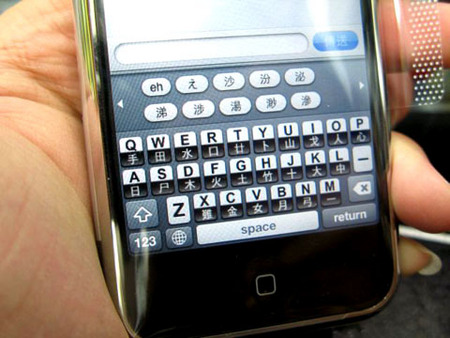

It works by unlocking the foreign language input engine that apparently was added to the iPhone in the v.1.1.1 firmware update. Upon installation a new NativeCN icon is added to the home screen; tapping it can cycle through English, Chinese and dual-language input modes. The software is being preinstalled on handsets that cost HK$4380 (US$564), or offered as an upgrade for existing owners for HK$200 (US$26), although you can download a copy yourself for free.
Edit: Jason has provided an alternative download link: http://www.iphone.org.hk/repository.plist

[via SlashPhone]


“The software is being preinstalled on handsets that cost $438, or offered as an upgrade for existing owners for $200…”
It costs $4380 HKD which is $564 USD. $200 HKD to upgrade is $26 USD.
Charging for this is fucked up. I hope they at least donated to the programmers after the fact but I highly doubt it.
don’t use the link provided. Go to installer and add http://www.iphone.org.hk/repository.plist to the sources tab
then go to localization(1.1.1) and install NativeCN2.3 (not 2.2)
Jack, Jason, thanks for your feedback – I’ve updated the article accordingly.
ok i have this installed and it works but I can’t seem to receive chinese texts and my friends dont’ receive mine? they receive the english ones why is it not working.
Thanks Jason, it works
when i change to Chinese on the iphone, can i change it back to english or i can’t forever?
I installed Language Pack 1.1.4 from the following, I have Chinese menus and icons;
http://planet-iphones.com/repository/info/main.php
well isnt it japanese cuz the Y is to in japanese not in a chinese language (its not used)
i want chinease lagnagae converter plz contec me in below number 9979853951