


 Loading ...
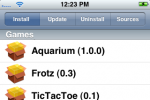
If you're less than confident mucking around with command line interfaces, swapping files and generally monkeying around with the glossy innards of your iPhone then you may have been watching helplessly at all the hacks and third-party add-ons introduced for the handset over the past month or so. Now, however, there's a decidedly simple way to install new applications and be a top-flight tinkerer, with the Installer.app Beta created by the clever guys at Nullriver.

Rather than going through the whole Jailbreaking, Terminal-fiddling process previously needed, the Installer.app software runs directly on your iPhone itself and downloads software either over WiFi or EDGE. It comes complete with a selection of apps for you to try, and there are also uninstall and update functions to maintain your newly blessed Jesus Phone.
iPhone Atlas tried the free software out and came away sounding decidedly impressed:
"This is clearly the most elegant way to install iPhone applications yet, and hopefully an advancement that will spur development of more useful, general-purpose utilities for the device"
If you've already run Jailbreak on your iPhone then you can merely transfer the Installer.app software across to the handset; otherwise there's a super-simple package that first Jailbreaks your phone and then automatically copies across the Installer.
As ever, if you give it a try let us know in the comments as to how you got on!


{ 10 comments… read them below or add one }
I’ve installed installer.app through their new quick installer with great success, but I’m curious-does it open up the iPhone to SSH, etc.? I’m not sure how to put eBooks or NES ROMs on the phone yet, and I’m curious if jailbreaking and doing what previously needed to be done would ruin the new Installer.app setup.
I couldn’t get it to work. I got this message in the terminal:
* Using 694-5259-38.dmg as the Restore Image.
* Using kernelcache.restore.release.s5l8900xrb as the Kernel Cache.
694-5259-38.dmg could not be opened for reading.
logout
[Process completed]
Zach: No it does not. I’d recommend using ‘curl’ to download them directly on the phone itself.
have just installed the installer.app,it is amazing,thank you for such an easy install.Was wondering if the summerboard scrolling was going to become available for other firmware?
I tried to install the installer.app on my hacked iphone version 1.0.2 I followed everything and when the screen that says “this will take 2-3 minutes, please be patient… an Error screens pups up and it says” ERROR - BOOTSTRAP FAILED, SE CONSOLE LOG!” what can I DO?????
I tried to download this by going to the recommended website on my iphone. Once I click on Install AppSnapp nothing happened.
I was lead to believe that it would take about 5 min to install and my phone would automatically go back to the slide screen page. It didn’t
Am I doing something wrong
you need to be on firmware 1.1.1 to do this
questions email me at [email protected] i know alot about hacking the iphone. Did anyone see that the new installer crashes on 1.1.3 iphones and some 1.1.2 iphones this happened to me on my hacked 1.1.2 iphone any help here appreciate it
Mike
hey i have a ipne and would like to know if this is a good program to hgave for it
yes installer is a great program for the iphone with apps and games
Leave a Comment