


 Loading ...
Most mobile phones follow the candybar, clamshell, or slider design style. The problem with these styles is that they leave too little space for user interfaces. For phones, users want a keypad; for texting and e-mail, users want a thumb keyboard; and for media players, users want a scroll wheel. When you try to combine all three interfaces, you get a cluttered and confusing mess.


Apple’s iPhone addresses this issue by using a touch screen user interface. The touch screen can be configured to display images of virtual user interfaces. Touch screens allow for a wide variety of different virtual user interfaces. However, touch screens do not provide any tactile feedback to users. With touchscreens, users cannot distinguish virtual user interface elements by touch. For some types of interfaces, this does not matter very much. However, the lack of tactile feedback makes it difficult to type. When the keys are small and grouped closely together, it is hard to precisely apply pressure to the right key without being able to feel the keys. Apple is including text prediction in the iPhone to automatically correct for typing errors for this reason. Moreover, many experienced thumb typists can often touch type with minimal visual reference, primarily relying instead on their sense of touch to locate buttons. With touch screens, users must look at the touch screen to interact with the virtual interface.
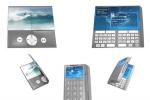
Nalu is a concept mobile phone, portable media player, and text messaging / e-mail device. (Nalu is the Hawaiian word for wave, which fits with the design’s wave-like shape.)
Nalu has a double hinged case to provide three different physical user interfaces: a telephone keypad, a scroll wheel, and a thumb keyboard. Users fold or unfold the design to reveal one interface and hide the other two.
When the phone is closed, it has the typical mobile phone keypad and a small display screen. By opening the phone on the left side, the design unfolds to a widescreen media player with a scroll wheel. By opening the phone on the right side, the design unfolds thumb keyboard for texting and e-mail. In the phone configuration, the other two interfaces are folded within the device and hidden.
This video shows how the folding works.

In the media player configuration, the scroll wheel interface is visible to the user and the thumb keyboard is folded inside the device and hidden.

In the e-mail device configuration, the thumb keyboard interface is visible to the user and the scroll wheel interface is folded inside the device and hidden.

When the device is folded closed, it has a tall and narrow form. In this form, the device is 52mm wide, approximately the same width as the Motorola Razr. In this form, the phone is small enough to hold up to your face to talk or to store in a pocket or purse. When the device is opened to the media player or the text messaging interface, the screen is 104mm wide, or slightly larger than the wide screen lcd on the Sony PSP. By portable device standards, this screen is enormous, making it superb for watching videos.
The curvature of the top and bottom surfaces of the phone enhance usability. In the phone configuration, the design fits in the user's closed hand. When opened to the media player configuration, the profile of the design includes a concave depression on the left side of the back surface to help the design rest flat in the user's open hand. In the text entry configuration, the profile of the design has a concave depression in the center of the back surface to help users grip the device with both hands while typing with their thumbs.
In the closed phone configuration, the plane of the right side surface fits with the user's right thumb. The large groove includes a touch pad for vertically scrolling through menus and address books. The groove also provides traction for opening and unfolding the design with one hand to access the other interfaces.

There is a camera on the back side of the phone as well.

This drawing explains how Nalu hides multiple interfaces.


Slider and clamshell phone designs are made of two parts connected with a hinge or sliding joint. Nalu is comprised of three modules: a top module, a center module, and a bottom module. The top and bottom modules are the same size. The center module is smaller in length than the other two modules. The center module has one flat surface and one convex surface. The flat surface of the center module has the left side of the keyboard. The right side of the keyboard is on the bottom module. The convex surface of the center module has the left side of the scroll wheel. The right side of the scroll wheel is on the top module.
The top module has a concave depression. The center module can fit inside this concave depression when the design is folded along the first hinge.

The top and bottom modules are folded around both hinges to close the design into the phone configuration:


Magnets are used to hold the pieces of the design together in the various configurations. This allows for a clean appearance with no unsightly protrusions.

My special thanks to Jon Hollander for taking the time to write this piece for My iPhone. -Vincent Nguyen


{ 2 comments… read them below or add one }
wait is this real?! if so, when might it be released email me back with info at [email protected]
Yes this is real. I found this on an Italian website tonight as a matter of fact.
Leave a Comment