
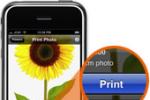
Once installed on your device, the app searches for any wireless HP printer on your home network. Then it is as easy as click and print.

“HP iPrint Photo is a free downloadable software application that allows you to quickly and easily print 4″ x 6″ photos. Images stored on your iPhone or iPod touch can print on most HP networked ink jet printers connected to a local WiFi network. Wireless printing is a fun extension of the iPhone / iPod touch’s easy photo capture and viewing experience.”
HP iPrint Photo uses Apple’s Bonjour technology to automatically identify HP wireless printers or other supported HP printers available on your network. HP iPrint supports industry standard WiFi environments (including Apple Airport, Linksys, D-Link and Netgear. To print using the technology via a computer, Apple iTunes must be installed.
[youtube]http://www.youtube.com/v/3s7Tf_j9eGo[/youtube]
[via GearLog]


AFAIK Bonjour is not Apple IP, it is their name for IEEE zeroconf standard.
And, I want a similar app to be able to print to my Bonjour enabled Epson printer! Or, I’d pay for an app that could discover and print to any Bonjour enabled printer directly from my iPhone (not via a computer printer queue). I guess printer manufacturer proprietary protocols are the biggest hurdle to universally printing to any printer over zeroconf.
Hi I’m getting a technical issue browsing your blog, I am getting 504 errors fairly regularly, I’m not much too sure about why however when I reload the page it comes okay.