
When it comes to enabling the iPhone to do more than it was intended to do, people typically incorporate hacks or special software to incorporate a new function. So won’t it be refreshing today to discover that you can share apps between iPhones without hacks or trickery? 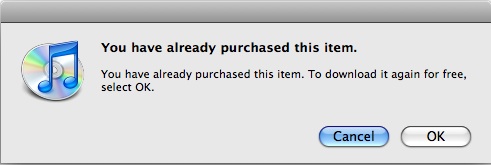
It’s simple. Just log into the iTunes library where you want to share the app with your AppleID that you used to buy the app the first time. Go to the AppStore and buy the app again. However, instead of having to pay, you will be prompted with a dialog that says, “You have already purchased this item,” and you’ll be able to download it again for free. Pretty cool, huh?
Then, just log out of your account on this second computer and the app should sync right up with the iPhone connected to that library. This is great if you and your spouse both have iPhones but don’t want to have to buy duplicate apps.
[via MacRumors]


I am confused, and I am really running into this on my and my wife’s iPhone. We use only one iMac to sync both iPhones, and sometimes I purchase an app and it shows up on her phone and vice verse. A good example is Enigma. I purchased it through my i[hone app store synced it to itunes after I made the purchase, then synced my wife’s iPhone and magically she had the application.
I just feel like it is very confusing when you have two iphones syncing with the same iTunes.
Maybe you can provide more clarity on this find of yours. I am just getting more confused. Is it OK to purchase the app once and be able to share it with other iphones. I don’t think so, but it sure would be nice to have.
I dont think this works when one of us has an iphone synced to a mac (and presumably downloaded mac software for her phone) whilst I have mine synced to a pc (and pc software) – is this right?