
Awesome. Google has added labels to Gmail for iPhone, allowing users to use color-coded tags to manage their inbox. The new Gmail for mobile supports iPhone/iPod Touch OS 2.2.1 or above.
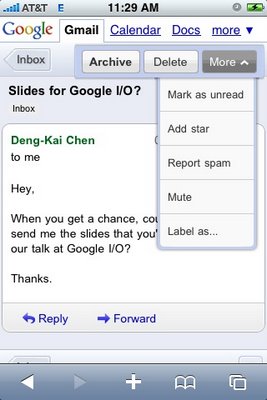
To label an email, select a message then tap ‘Label as…” from the drop-down menu on the Floaty Bar. In the pop-up menu, select the label(s) you would like to use and tap ‘Apply’. Please note, you can add and remove existing labels to your emails in Gmail for mobile, but labels can only be created, renamed and deleted in the desktop version.
[via Google Mobile Blog]


Bummer, Budi’s on EDGE. Yuck. Did this roll out today? I’ve had labels for a while…
Yeah, it’s announced officially yesterday. [ http://googlemobile.blogspot.com/2009/05/iterative-web-app-gmail-for-mobile-gets.html ]
Thanks.
Wonderful beat ! I would like to apprentice as you amend your website, how can i subscribe for one blog site? The account helped us a acceptable deal. I had been tiny bit acquainted of this your broadcast provided bright clear idea