

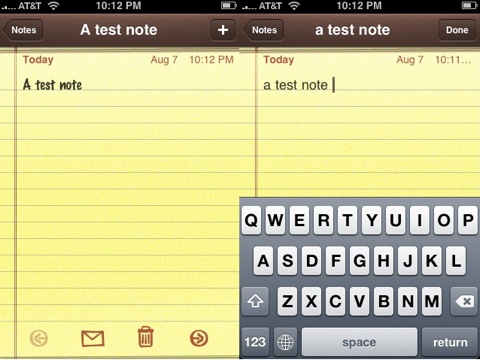
If you, like many, are sick of the look of the felt marker look in the iPhone Notes app, you can switch it out for something less bulky. And the best part is, the tools to complete this changeover are included in your iPhone already. No hacking required!
Step 1: Go into your iPhone’s Settings>General>Keyboard.
Step 2: Go into International Keyboards
Step 3: Select Chinese, then pick either one of the Chinese keyboards.
Step 4: Activate Pinyin.
Step 5: Press the Home button, then open the Notes app.
Step 6: When you go to type, you should see a world key. Tap it and the keyboard will change to the Chinese one. Press one letter to see the font has changed.
Step 7: Press the world key again and the keyboard will switch back to English. Now, this note will be typed on the less bold font.
You’ll need to press the world key for each new note you make, but it’s worth it if you’re sick of looking at that felt-tipped font.
[via The iPhone Blog]


