

Something I can’t remember hearing much complaint about, surprisingly, is the absence of handwriting recognition on the iPhone. There have been various studies comparing the on-screen QWERTY keyboard with T9 and hardware thumb-board options, but seemingly little demand for the ability to write directly onto the cellphone’s screen. Well, anybody who has missed such an option can now install iPhone Graffiti; as the name suggests, it’s a version of the Graffiti handwriting recognition, as seen on Palm OS devices.
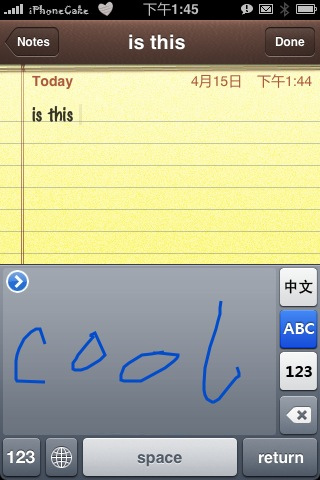
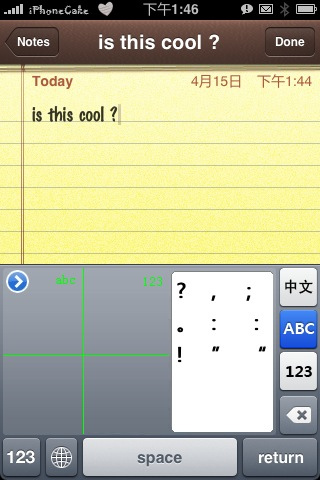
Supporting Latin and Chinese characters, as well as full punctuation and symbols, letters are drawn on the input grid in the lower half of the screen and converted as you write. Since the iPhone doesn’t use a stylus, you might find you need to train your finger to make the shapes clearly. Alternatively there are a couple of compatible styli available, such as from Pogo.
iPhone Graffiti is still in early beta form, so the advice is to back up your handset before installing it. Some users are experiencing an issue with uninstalling the app, too, so if you’re overly cautious then maybe wait for a version further down the line. Still interested? Add iphonecake.com/src/all as a source to Installer and go from there.
[via ModMyiFone]


From ancient days of Palm Pilot up to O2 XDA (I,II, IIs) & further up to Windows Pocket PCs’ & Mobile 6.+’s Block Recognizer;…
I have been (& still am) a dedicated loyal Graffiti text input user.
While searching through the Web for last 12 months, I have agonized over the sad stupid reality of a Graffiti-less iPhone world.
It seems that though I truly wanted to buy an iPhone; yet now, Apple’s corporate myopia in this matter, will force, coerce, compel me to buy the latest Android phone (newly allied with Graffiti)instead of theirs.
They are truly blind & yet they boast of “understanding the market”
Hello Mr Plainman,
Did you find a solution? Having used my SonyEricson P1i for years -and got 2 of them currently!- I am in the same situation, and feel like going I-phone if I can find a solution. Did you find any good equivalent of handwriting recognition for I-phone so txt can be transferred to word documents?
I was also really wanting to use the iPhone Graffiti, but it seems to have vaporized!!!!
I was looking at another system called WritePad. It’s on iTunes and I also went to the developers website. Not graffiti per se, but an okay substitute.
I went with iPhone for the apps it supports but really miss my PDA. Would love to have Graffiti again if not all the “hand writing” tools.
Please somebody fix graffiti for iOS. Perfect for iPhone, but great for iPad notes!! I’m sure a lot of users are willing to pay for the app.
As a longtime Graffiti user (since the 512k Palm) I’ve transplanted Graffiti 1 to replace Graffiti 2 on my “newer” Palm OS 5 Clie TH55. I hope this works out for the iPhone or something.
I am looking at the new iPhone 4S, but I too am addicted to Graffiti, and can’t imagine a phone without it! Of course I have always had a resistive touch screen, which seem to be more and more difficult to find as a standard (iPhone and Android us Capacitive Touch Screen … meaning must use finger touch vs. resistive “anything” touch).
My current phone is a windows based Samsung that is locked in Windows 6.5 and is getting worse and worse as the months go by. I need to upgrade and that SIRI and iPhone 4S look very inviting, but I don’t think I can live without my Graffiti!
PLEASE PLEASE I hope Apple or someone comes up with an App to fill the void of all us Graffiti DieHards!