

Your private information may be at risk on your iPhone now that the 2.0.2 update has made the rounds. Why is this the case? Quite simply, anyone can break into your phone and access your private information including Contacts, Safari, Mail and SMS even if you have a password set.
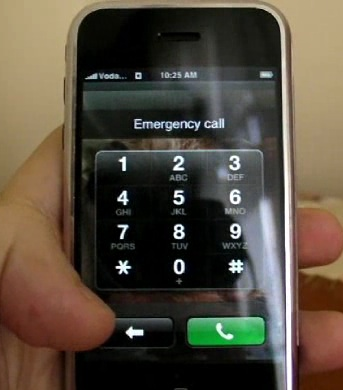
The following was posted on Gizmodo and will explain what the problem looks like and how to avoid it until Apple comes up with a fix for this bug.
First, password protect your phone and lock it. Then slide to unlock and do this:
1. Tap emergency call.
2. Double tap the home button.Done. You are now in your favorites. This seems like a feature, because you may want to have emergency number in your favorites for quick dial. The security problem here is double. The first: anyone picking up your phone can make a call to anyone in your favorites. On top of that, this also opens access to your full Address Book, the dial keypad, and your voice mail.
If that wasn’t bad enough, the second one is even worse: if you tap on the blue arrows next to the names, it will give you full access to the private information in a favorite entry. And it goes downhill from there:
• If you click in a mail address, it will give you full access to the Mail application. All your mail will be exposed.
• If there’s a URL in your contact (or in a mail message) you can click on it and have full access to Safari.
• If you click on send text message in a contact, it will give you full access to all your SMS.Hopefully, this major security break that fully exposes your most private information will be solved as soon as possible. Until then, you can avoid any potential breach doing the following:
1. In the iPhone home, go to Settings.
2. Click on General.
3. Click on Home Button.
4. Click on either “Home” or “iPod”.This way, the double-click on the home button will take the user back to the unlock screen (if you use “Home”) or the iPod screen. I recommend using Home. You will lose the ability to quickly access your favorites for a quick call—which is one of my favorite features—but that’s better than having all your private mails, contacts, and SMS database compromised.
[via Gizmodo]


This is big… I can see several corporations rolling back iphone/exchange support until this is fixed. Corporate secure emails/data is not secure even if they have set the exchange option requiring that synchronized handsets are secured behind a pass code.
I agree with Rick, this is a biggy. I have a full 8 digit security code, and i could get to most of my Data with this bug, within less time than it takes me to enter the code…
Is illustrating the flaw to the general public a very wise thing to do? I guess it may expedite a resolution from Apple, but it also gives everyone a blueprint on how to exploit the security flaw. Why not post the recipe for a dirty bomb while we’re at it?
I like this theme you are using… what is it?
Ciao,
mi è piaciuto parecchio questo post sulla sicurezza.
Anche io facendo un mio blog sull’argomento ( http://www.agenzia-investigazioni-sicurezza.info ).
Spero che gli darai un’occhiata!
Buon lavoro
great put up, very informative. I’m wondering why the other specialists of this sector do not realize this. You should proceed your writing. I’m sure, you have a great readers’ base already!